An In-Depth Review of ProWritingAid: Is It the Ultimate Tool for Serious Writers?
Editing a novel or a massive writing project is vastly different from proofreading a short blog post or an email. While standard grammar checkers look for surface-level typos, long-form creative writers need something that looks at the deeper architecture of their prose—pacing, dialogue tags, structural rhythm, and the overuse of weak narrative elements.
ProWritingAid has long positioned itself as the premier “developmental editor in a box” for authors. In this review, we break down exactly how it functions under the bonnet, where it shines, and where it hits its limits.

Beyond Grammar: The Core Analysis Reports
What sets this software apart from general tools like Grammarly is its suite of over 20 distinct writing reports. Instead of just highlighting red squiggly lines, it isolates specific stylistic habits that stall narrative momentum:
- The Sticky Sentences Report: Flags sentences reliant on “glue words” (empty transitional words like just, then, that, actually) which slow down readability.
- The Pacing Report: Visualizes where your action sequences lag or where your exposition dumps run too long, ensuring your chapters flow dynamically.
- The Dialogue Tags Check: Identifies weak, repetitive, or overly dramatic speech attribution, helping you keep your dialogue crisp and character-driven.
- The Alliteration and Echoes Report: Catches accidental word repetitions occurring within a few paragraphs of each other, which can inadvertently pull a reader out of the immersion.
Integration and Desktop Performance
For novelists, an editing tool is only as good as its integrations. Working inside an isolated browser window is fine for short copy, but if you have a 90,000-word book split into scenes, you need local flexibility.
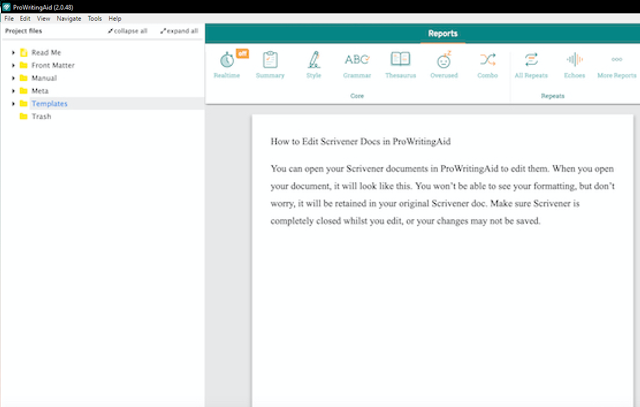
ProWritingAid provides robust integration options across platforms, operating smoothly alongside professional novel-building software like Scrivener, MS Word, and Atticus. The dedicated desktop app allows you to open native Scrivener projects directly, make your line edits, and save changes straight back into your project structure without breaking your compile formatting.
The Verdict: Pros and Cons
What We Love
- Deep structural analytics that mimic real human editorial feedback.
- Flawless handling of large manuscript files without crashing.
- Customizable style guides and customizable dictionary options for high-fantasy or sci-fi world-building.
What Could Be Better
- The sheer number of charts and reports can feel incredibly overwhelming to a beginner.
- Running every single check at once can cause visual clutter on smaller screens.
Final Thoughts
If you’re writing simple articles or casual copy, a lightweight tool is more than enough. However, if you are polishing a complex manuscript, managing subplots, or cleaning up character voice, ProWritingAid’s heavy-duty analytical reporting makes it an essential tool for the serious writer’s toolkit.
Problems with the software
Prowritingaid doesn’t handle large documents well. When attempting to edit my entire novel in one word document, ProWritingAid would make changes that I hadn’t authorised. It loves to change instances of the words happy, or pleased to “Glee”. It wants to make every instance of great into magnificent or some other such superlative. When writing about the government of Great Britain, this becomes very annoying fast.
The programme also advises to add commas, only then to tell you the comma is not needed. Of course, when you delete said comma, another error message appears. This is really annoying and no matter how often I have reported the error to the developers, it persists.
The errant added words can be countered by breaking your novel down into smaller sub-documets, but this is a pain that shouldn’t be necessary. Grammarly was well able to handle these large documents, although that software is far less powerful. Prowritingaid is a good help for writers and if they could only iron out the bugs, it would be great.